 Panludia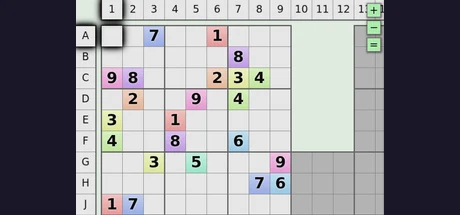
COMMUNITY INTEGRATION
ArchipeladokuArchipelago randomizer mod
Sudoku grows into a multiworld journey. Begin with one revealed board, then receive items that unlock blocks of overlapping puzzles. Solving rows, columns, blocks and whole boards sends checks to the other players.
Maintained by Galdiuz
- Reviewed build
- 2026.09.26
- OS
- Browser
- Last reviewed
- 9 Oct 2026
- Installation
- Manual installation
How the game changes
- Choose individual boards or clusters of overlapping boards. The default is five 9-by-9 boards in a cluster of five. Board sizes range from 4 to 16, with a requested count of 3 to 100; the largest sizes have lower board-count limits.
- Shuffled progression, the default, delivers items for specific blocks. Fixed progression uses Progressive Block items in a defined unlock order. Bundles let one received item reveal several blocks, up to one board's worth.
- Solved blocks, rows, columns and boards are distinct check categories. Disable selected categories to reduce check density; generation may re-enable categories if too few locations remain for the progression pool.
- Finish by solving every cell across the generated puzzles. Receiving every required block makes completion accessible, but does not solve the sudoku for you. Duplicate progression items can ease waiting; fixed progression can produce a smoother sequence.
- Difficulty describes solving techniques, separately from how many boards you play. Easy is the default; Beginner uses singles, while Very Hard can require X-Wing, Swordfish and Y-Wing techniques.
- Useful filler can solve a selected cell, solve a random cell or remove a candidate. Optional Emoji, Disco and Tunnel Vision traps temporarily alter the display. Their default ratios are nonzero, so set them to zero if these effects are unwanted.
- Nothing fills unused reward slots. By default, its pre-fill setting keeps those items inside Archipeladoku rather than sending them to other games. Bundling and removing check categories are other ways to change the size of the item pool.
- DeathLink is off by default and receive-only. An incoming death clears non-given numbers; the sudoku client does not send deaths back. Location scouting can be manual, automatic or disabled. The website also offers local practice and YAML generation.
- Release 2026.09.26 adds optional extra starting blocks beyond the first board and supports start_inventory_from_pool. A host setting can enforce a minimum share of Nothing items placed inside this game; the default starting-block count remains unchanged.
Before you start
- Install the published APWorld on the room generator, generate your room, then connect from the author's browser client using the exact slot name. No separate desktop game or Panludia launcher installation is required.
- The reviewed APWorld identifies version 2026.09.26 and its files match the tagged source. The captured browser bundle identifies the same source revision, 5780d885. The live website can still be updated independently of that release.
- Online saves use IndexedDB in the current browser and website origin. Only the ten most recently saved online games are retained, alongside the local game. Clearing browser data, switching profiles or exceeding that retention can remove your local puzzle progress.
- Save selection uses a generated 32-bit puzzle seed, not a full server-and-slot identity. That seed is generated per world instance, but uniqueness across recreated rooms is not guaranteed. Avoid treating identical regenerated seeds as independently isolated saves.
- The client remembers connection history and the password in browser local storage. Use your own browser profile, avoid shared machines and do not share raw browser-storage exports. Resetting client settings intentionally preserves connection fields.
- Reconnecting restores a saved board and server item history. Use Sync solved to server if completed areas have not reached the room. Saves are delayed and the client has no acknowledged outgoing queue, so the latest actions are not guaranteed to survive an abrupt close.
- Large boards and many overlapping puzzles increase generation time and solving effort. The board cap is 64 for size 12 and 36 for size 16. Start small and increase the count based on how long you actually take to solve a board. If generation stops without completing, the inspected worker has no explicit failure message to return you to the menu; reload and try a smaller configuration.
- Too many priority or planned locations can leave insufficient room for pre-filled Nothing items and stop generation. Removing most other filler can also make generation harder; the defaults are a better first run than combining extreme pool restrictions.
- This update was reviewed from the tagged World, browser sources and captured deployed bundle. No live Archipelago room or complete puzzle run was performed for this version. The revised reliability badge reflects specific persistence and recovery limits, not proof that this release introduced them.